Espanso
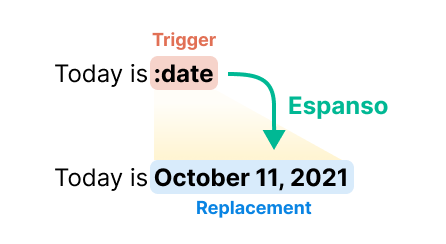
- Espanso is an open-source, free-to-use, cross-platform (Windows, macOS, Linux) snippet app.
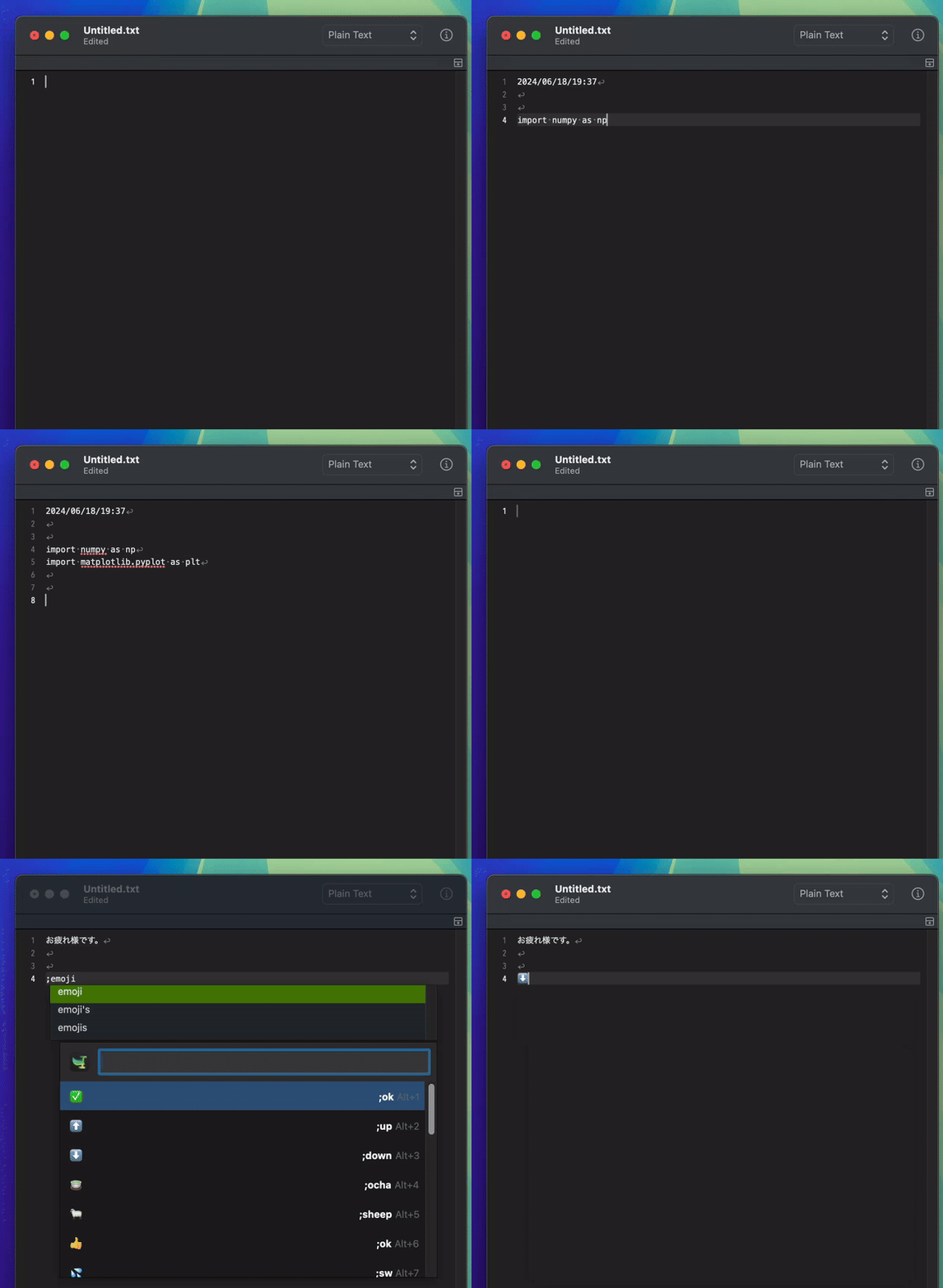
- By simply typing short keywords, you can instantly input long text. This makes it easy to type text that needs to be entered repeatedly.
- It's faster and more feature-rich than Mac's standard text dictionary.
- Furthermore, since it can call shell scripts, it's not just a snippet app - it has very high extensibility, allowing you to open apps and files, call APIs, and more.
- For example, you can instantly translate text copied to the clipboard using an LLM API without having to leave your current application.

Installation
espanso status to check if it's running.
Configuration
espanso/
├── config/
│   └── default.yml
└── match/
└── base.ymlespanso directory varies by OS and can be checked with the command espanso path.
- Linux:
$XDG_CONFIG_HOME/espanso(e.g./home/user/.config/espanso) - MacOS:
$HOME/Library/Application Support/espanso(e.g./Users/user/Library/Application Support/espanso) - Windows:
{FOLDERID_RoamingAppData}\espanso(e.g.C:\Users\user\AppData\Roaming\espanso)
config/default.yml file at first.
If you want to hide the menu bar icon, you can write show_icon: false.
Usage
Snippet configuration is written in thematch/base.yml file.
Basically, you write with the following syntax:
matches:
  - trigger: ";hello"
    replace: "world"

# Multiple lines
  - trigger: ";hello"
    replace: "line1\nline2"

# Multiple lines
  - trigger: ";include newlines"
    replace: |
              exactly as you see
              will appear these three
              lines of poetry

# No newlines
  - trigger: ";fold newlines"
    replace: >
              this is really a
              single line of text
despite appearancesmatch/base.yml, reload it by clicking Reload in the menu bar or executing the command espanso restart.
Warning
To prevent unwanted snippet activation, it's good to use symbols like
: or ; that you don't normally use as prefixes. This article uses ;.Warning
If you register
;a, triggers like ;as or ;ad won't work. This is because when you type ;a, it gets replaced with different text. To prevent this, it's better to avoid setting triggers that are too short.Tip
All
.yml files in the match directory are loaded, so you can split files finely according to their purpose.Dynamic Matches
With the following configuration, typing;now converts to something like It's 11:29 showing the current time.
  - trigger: ";now"
    replace: It's {{mytime}}
    vars:
      - name: mytime
        type: date
        params:
          format: "%H:%M"
Word Match
With the basictrigger and match configuration method, conversions might occur when you don't want them. For example, when you want to convert to there with the trigger ther, if you type other, the conversion will execute and become othere. To prevent this, add the word: true option as follows:
  - trigger: "ther"
    replace: there
    word: true
Cursor Hint
You can determine where the cursor comes after text conversion with$|$.
  - trigger: ";div"
    replace: <div>$|$</div>
Multiple Replacements for One Trigger
  - trigger: ";quote"
    replace: "Every moment is a fresh beginning."
  - trigger: ";quote"
    replace: "Everything you can imagine is real."
  - trigger: ";quote"
    replace: "Whatever you do, do it well."
One Replacement for Multiple Triggers
  - triggers: [";hello", ";hi"]
    replace: "world"
Multiple Replacements for Multiple Triggers
  - triggers: [";ok",";emoji"]
    replace: "👍"
  - triggers: [";ok",";emoji"]
    replace: "✅"
  - triggers: [";up",";emoji"]
    replace: "⬆️"
  - triggers: [";down",";emoji"]
    replace: "⬇️"
Image Match
  - trigger: ";cat"
    image_path: "$CONFIG/images/cat.png"
Global Variables
If there are variables commonly used acrossmatch, setting them as global variables is convenient for making changes.
global_vars:
  - name: myname
    type: echo
    params:
      echo: "John"
# It can also be defined as follows:
#  - name: myname
#    type: shell
#    params:
#      cmd: "echo John"

matches:
  - trigger: ";greet"
    replace: "Hello {{myname}}"

  - trigger: ";sig"
replace: "Best regards, {{myname}}"params.yml and add params.yml to .gitignore. All *.yml files in the match directory are loaded. Otherwise, you can also import by specifying the path directly.
espanso/
├── config/
│   └── default.yml
└── match/
    ├── base.yml
    ├── params.yml
    ...
params.yml
# Adding this file to .gitignore is safe
global_vars:
  - name: MY_API
    type: echo
    params:
      echo: "EmitDqIhb7Rzu5GheVtiwL452..."
base.yml
# YML file outside of espanso/match/
imports:
  - "paths/to/your.yml"

matches:
  - trigger: ";myapi"
    replace: "{{MY_API}}"
Clipboard Extension
You can include clipboard contents in the output after conversion. This eliminates the need for pasting operations. For example, when you want to create an HTML<a> tag using a recently copied link, define the trigger as follows:
  - trigger: ";aref"
    replace: "<a href='{{clip}}' />$|$</a>"
    vars:
      - name: "clip"
type: "clipboard" - trigger: ";mdlink"
replace: "[$|$]({{clip}})"
vars:
- name: "clip"
type: "clipboard"
- trigger: ";mdcode"
replace: |
```
{{clip}}
```
vars:
- name: "clip"
type: "clipboard"Tip
If you find it tedious to define clipboard variables for each trigger, it's good to define it in
global_vars as follows:global_vars:
- name: "clip"
type: "clipboard"
matches:
- trigger: ";mdlink"
replace: "[$|$]({{clip}})"Shell Extension
You can also execute shell commands and output the results. - trigger: ";shell"
replace: "{{output}}"
vars:
- name: output
type: shell
params:
cmd: "echo 'Hello from your shell'" - trigger: ";ip"
replace: "{{output}}"
vars:
- name: output
type: shell
params:
cmd: "curl 'https://api.ipify.org'" - trigger: ";uuid"
replace: "{{output}}"
vars:
- name: output
type: shell
params:
# macOS,Linux:
cmd: "uuidgen"
# Windows (requires PowerShell):
# cmd: "powershell -command \"[guid]::NewGuid().ToString()\"" - trigger: ";term"
replace: "{{output}}"
vars:
- name: output
type: shell
params:
cmd: "open -a Terminal.app"
- trigger: ";dotfile"
replace: "{{output}}"
vars:
- name: output
type: shell
params:
cmd: "open ~/dotfiles/"
- trigger: ";desk"
replace: "{{output}}"
vars:
- name: output
type: shell
params:
cmd: "open ~/Desktop" - trigger: ";newfile"
replace: "{{output}}"
vars:
- name: uuid
type: shell
params:
cmd: "uuidgen"
- name: output
type: shell
params:
cmd: "cd ~/Desktop; touch {{uuid}}.md; open /Applications/CotEditor.app {{uuid}}.md" - trigger: ";you"
replace: "{{output}}"
vars:
- name: output
type: shell
params:
cmd: "open 'https://www.youtube.com/'" - trigger: ";ggl"
replace: "{{output}}"
vars:
- name: "clip"
type: "clipboard"
- name: output
type: shell
params:
cmd: "open 'https://www.google.com/search?q={{clip}}'"settings.json configuration. In the following case, it switches the PDF Viewer color inversion setting of the latex-workshop extension between "latex-workshop.view.pdf.invert": 0 and "latex-workshop.view.pdf.invert": 1.
  - trigger: ";invert"
    replace: "{{output}}"
    vars:
      - name: path
        type: echo
        params:
          echo: "~/Library/Application\\ Support/Code/User/settings.json"
      - name: output
        type: shell
        params:
          cmd: |
            if grep -q "\"latex-workshop.view.pdf.invert\": 1" {{path}};
            then sed -i '' 's/\"latex-workshop.view.pdf.invert\": 1/\"latex-workshop.view.pdf.invert\": 0/' {{path}};
            elif grep -q "\"latex-workshop.view.pdf.invert\": 0" {{path}};
            then sed -i '' 's/\"latex-workshop.view.pdf.invert\": 0/\"latex-workshop.view.pdf.invert\": 1/' {{path}};
            else echo "No matching pattern found.";
fi - trigger: ";tomd"
replace: |
- Webpage to Markdown Conversion by https://urltomarkdown.herokuapp.com/
- Source URL: {{clipboard}}
- Conversion Timestamp: {{now}}
===================================================
{{output}}
vars:
- name: output
type: shell
params:
cmd: |
curl "https://urltomarkdown.herokuapp.com/?url={{clipboard}}";jet, and the English translation by Google Gemini will be inserted at the cursor position. Please use it after defining GEMINI_API_KEY in global_vars. You can define it in the same file, but be careful not to make it public when managing on GitHub. Get GEMINI_API_KEY from here
global_vars:
  - name: GEMINI_API_KEY
    type: echo
    params:
      echo: "EmitDqIhb7Rzu5GheVtiwL452...."

matches:
  - trigger: ";jet"
    replace: "{{translation}}"
    vars:
      - name: "clip"
        type: "clipboard"
      - name: gemini_model
        type: echo
        params:
          echo: "gemini-2.5-flash"
      - name: translation
        type: shell
        params:
          cmd: >
            curl -s \
              "https://generativelanguage.googleapis.com/v1beta/models/{{gemini_model}}:generateContent" \
              -H "x-goog-api-key: {{GEMINI_API_KEY}}" \
              -H 'Content-Type: application/json' \
              -X POST \
              -d '{
                    "contents": [{
                      "parts": [{"text": "Translate the following to English. Provide ONLY the translated text, no explanations or markdown: {{clip}}"}]
                    }]
                  }' \
            | jq -r '.candidates[0].content.parts[0].text | split("\n")[0]'
Note
The jq command is required:
brew install jq. It's used to parse JSON responses from the API.Warning
If the above trigger returns an error, check Google's documentation to see if the model
gemini-2.5-flash is currently available. If there's no problem with the model name, check the REST section of this page to see if the API calling method has been updated.Tip
At the time of writing, the faster-responding model
gemini-2.5-flash-lite is also available.Tip
By changing the instructions (prompt), you can create all kinds of triggers, not just translation, such as proofreading, summarizing, refactoring, etc.
Script Extension
You can also execute external files and receive the results./path/to/your/script.py
print("Hello from python")base.yml
  - trigger: ";pyscript"
    replace: "{{output}}"
    vars:
      - name: output
        type: script
        params:
          args:
            - python
            - /path/to/your/script.py
Form Extension (Interactive Snippets)
You can generate forms from triggers and create sentences following templates. - trigger: ";greet"
form: |
Hey [[name]],
Happy Birthday!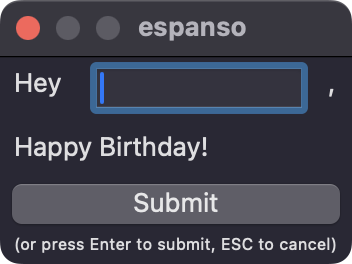
# The above is equivalent to the following
  - trigger: ";_greet"
    replace: |
        Hey {{form.name}},
        Happy Birthday!
    vars:
      - name: "form"
        type: form
        params:
          layout: |
            Hey [[name]],
            Happy Birthday!
Warning
In complex cases where you use both
variable and form in the same trigger, it seems this notation is required for it to work.Creating Sentences from Email Template Forms
matches:
  - trigger: ";reply"
    form: |
        Hi, [[name]]

        Thank you for your email and for bringing this to our attention.
        I am sorry that you're disappointed with our product.

        [[choices]]

        Looking forward to hearing from you

        All the best,
        ABC Support Team
    form_fields:
      choices:
        type: choice
        values:
          - Could you please let me know what specific issues you've encountered?
          - sentence 2
          - sentence 3
          - sentence 4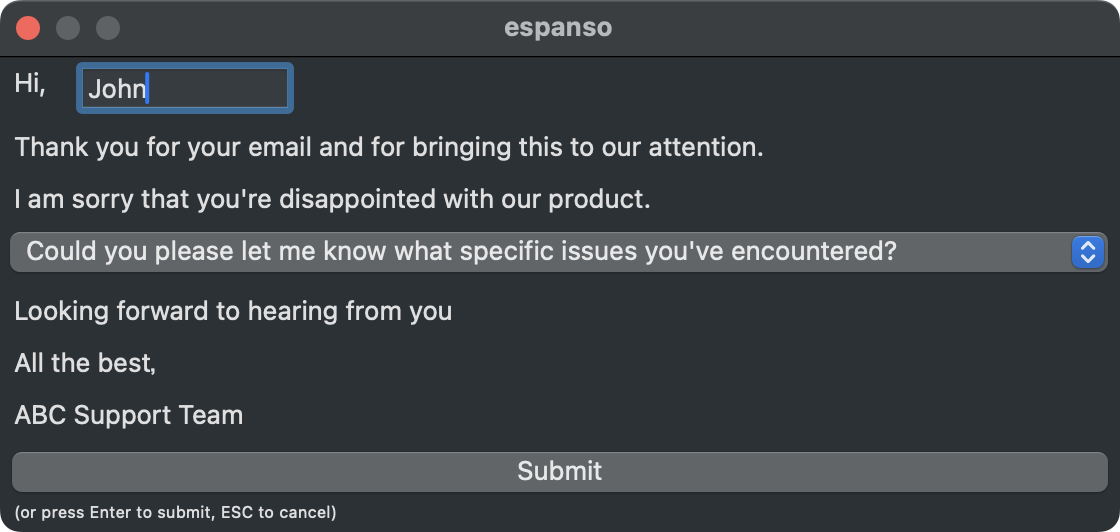
Creating Todo Items
  - trigger: ";todo"
    replace: "- Task: {{form1.task}}, Due Date: {{form1.day}} {{form1.time}}"
    vars:
      - name: "days"
        type: shell
        params:
          cmd: "for i in {0..6}; do date -v+${i}d '+%Y/%m/%d'; done"
      - name: "hours"
        type: shell
        params:
          cmd: "for i in {8..20}; do echo \"$i:00\"; done"
      - name: "form1"
        type: form
        params:
          layout: "Task: [[task]], Due Date: [[day]] [[time]]"
          fields:
            day:
              type: choice
              values: "{{days}}"
            time:
              type: choice
              values: "{{hours}}"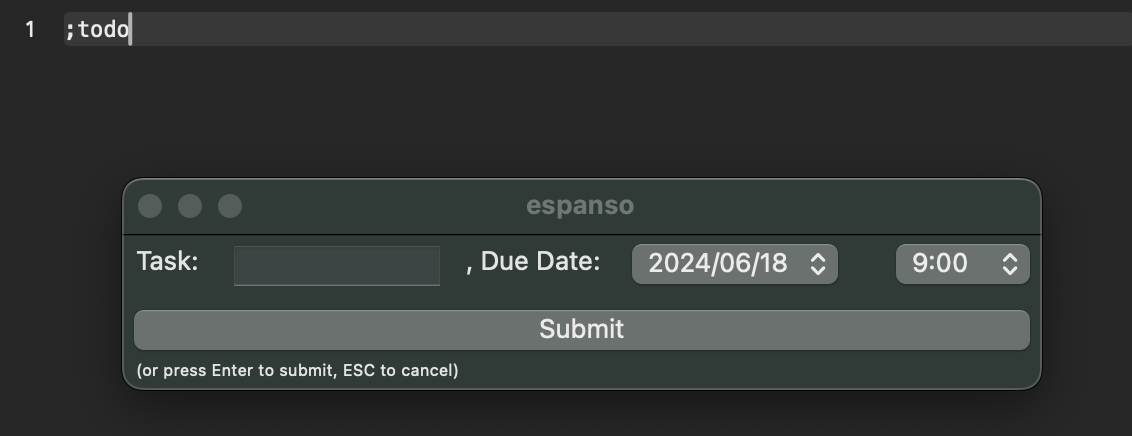
Text Case Style Conversion
A powerful example combining forms and shell scripts. It converts clipboard text to the format selected in the form (camel case, snake case, etc.). - trigger: ";case"
replace: "{{output}}"
vars:
- name: form
type: form
params:
layout: "Convert clipboard to: [[style]]"
fields:
style:
type: choice
values: ["UPPERCASE", "lowercase", "PascalCase", "camelCase", "Title Case", "kebab-case", "snake_case"]
- name: output
type: shell
params:
cmd: |
text="{{clipboard}}"
case "{{form.style}}" in
"UPPERCASE") echo "$text" | tr '[:lower:]' '[:upper:]';;
"lowercase") echo "$text" | tr '[:upper:]' '[:lower:]';;
"PascalCase") echo "$text" | awk '{for(i=1;i<=NF;i++) $i=toupper(substr($i,1,1)) tolower(substr($i,2));}1' | tr -d ' ';;
"camelCase") echo "$text" | awk '{out=tolower($1); for(i=2;i<=NF;i++){out=out toupper(substr($i,1,1)) tolower(substr($i,2))}; print out}';;
"Title Case") echo "$text" | awk '{for(i=1;i<=NF;i++) $i=toupper(substr($i,1,1)) tolower(substr($i,2));}1';;
"kebab-case") echo "$text" | sed -E 's/[^a-zA-Z0-9 ]+//g' | tr '[:upper:]' '[:lower:]' | tr -s ' ' '-';;
"snake_case") echo "$text" | sed -E 's/[^a-zA-Z0-9 ]+//g' | tr '[:upper:]' '[:lower:]' | tr -s ' ' '_';;
esacCurrency Conversion
  - trigger: ";currency"
    replace: "{{conversion}}"
    vars:
      - name: form
        type: form
        params:
          layout: |
                  Amount: [[amount]]
                  From: [[from]]
                  To: [[to]]
          fields:
            from:
              type: choice
              values: ["USD", "JPY", "CHF", "EUR", "GBP", "CNY", "KRW", "CAD", "AUD"]
            to:
              type: choice
              values: ["JPY", "USD", "EUR", "CHF", "GBP", "CNY", "KRW", "CAD", "AUD"]
      - name: conversion
        type: shell
        params:
          cmd: "curl -s 'https://api.exchangerate-api.com/v4/latest/{{form.from}}' | jq -r '.rates.{{form.to}} * {{form.amount}} | round * 100 / 100' | xargs printf '{{form.amount}} {{form.from}} = %.2f {{form.to}}\\n'"